
-2.png)
Cloaking has long been part of the working infrastructure of media buyers and arbitrators who work with Google Ads, Facebook Ads and other paid traffic sources. Without properly configured filtering of bots, moderators and unwanted traffic, stable launches in difficult niches turn into a lottery.
In practice, most problems with cloaking arise not because of the service itself, but because of errors at the stage of the first connection: incorrect White Page, incorrect integration, chaotic filters without testing. As a result, the buyer receives broken streams, lack of clicks in statistics or incorrect distribution of traffic.
In this material, together with the Cloaking.House team, we analyze in detail how to correctly connect cloaking the first time: from preparing a White Page and creating flows to integrating into the infrastructure and checking the correct operation of filtering. The guide is focused on practice and real traffic scenarios.
Cloaking technology in detail: how it works in Cloaking.House
Cloaking is a traffic distribution and filtering technology that allows you to display different content depending on the characteristics of the visitor. In the practice of traffic arbitrage, this means that targeted users get access to the Offer Page (landing or pre-landing), while ad platform moderators, bots, crawlers and unwanted traffic are redirected to the White Page, a secure page.
In the field of traffic arbitration, cloaking is used for:
- filtering bots and automatic checks,
- advertising account protection,
- traffic distribution by GEO, devices, ISP, IP and other parameters,
- increasing the stability and "life expectancy" of advertising campaigns.
About Cloaking.House service
Cloaking.House is a cloud platform for filtering traffic and creating flows with flexible distribution rules. The service is aimed at arbitrators and media buyers who work with various traffic sources.
Main capabilities of the platform:
- creation of streams with detailed filtering conditions;
- connection of own domains;
- integration through a PHP script or a ready-made cloaking link;
- traffic check on VPN, proxy and bots;
- analytics by hits, countries, devices and IP;
- built-in White Page generator.
- Free trial for 7 days
The service works in the cloud, so it does not need a separate server for the filtering logic - hosting for the page or a connected domain is enough.
A detailed guide to setting up cloaking in Cloaking.House
1. Preparation and configuration of the White Page
The first stage of work with Cloaking.House there is a preparation of the White Page - it will be displayed to moderators, bots and traffic that does not pass filtering.
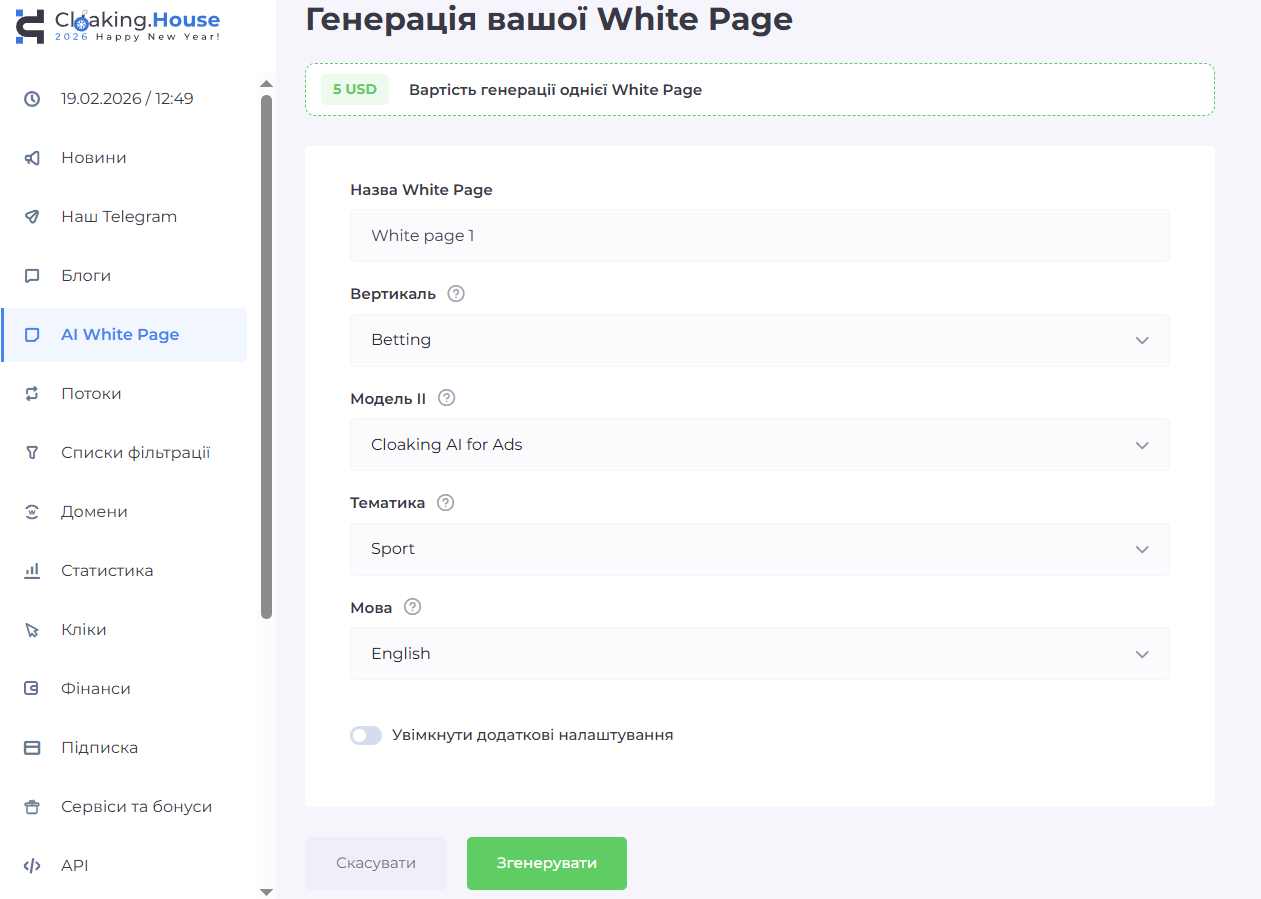
A built-in White Page generator is available in the service panel.
Main generation parameters:
- White Page Name: A field for entering the internal name of the page, so that it can be conveniently found in the list later.
- Vertical: Choosing the niche for which the page is being created. For example, was chosen «Betting» (Bet rates).
- Model II: Choosing an artificial intelligence algorithm that will generate content. Chosen «Cloaking AI for Ads» — the page will have a structure similar to WordPress templates, which makes it as close as possible to real blogs.
- Subject: Specification of content. The topics are logically chosen for bets «Sport».
- Language: Selection of the language in which the text will be written on the page.
After generating the White Page, the resulting archive must be uploaded to your hosting and placed in the root folder of the domain (public_html or similar). The main file (usually index.html) should be renamed.
In our example, the main White Page file is renamed to site.html. This is necessary so that in the future there is no conflict with the cloaking index.php file.
2. Creating a stream and setting up links
After the White Page is uploaded to the domain and the main file is prepared (in our example site.html), you can proceed to creating a stream. To do this, go to the section Streams, press Create a stream and specify a stream name.
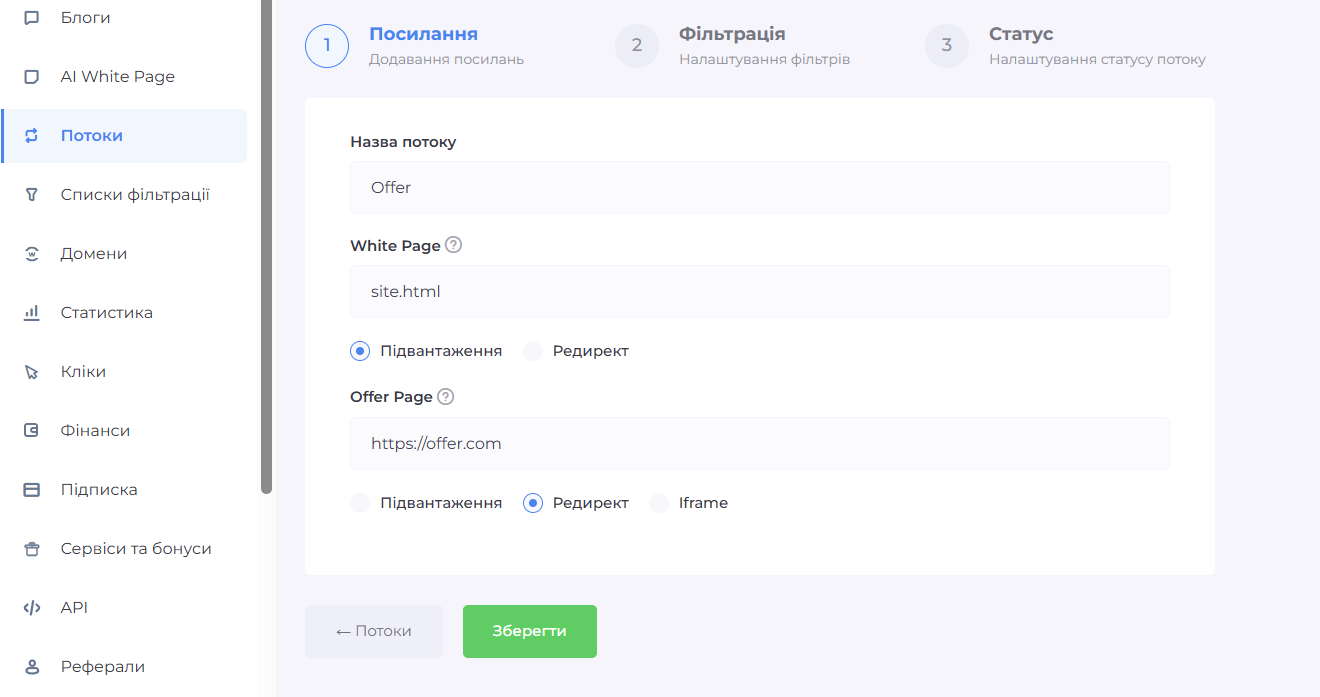
At the link setting stage, you need to specify two key pages: White Page and Offer Page.
- In the field White Page specify the path to your main file (site.html) and choose the method of operation Loading, which allows for a more natural display of the page during inspections and minimizes technical risks.
- In the field Offer Page insert a link to the landing page, which in our case can be a direct landing page, pre-landing page, partner offer or own intermediate landing page.
It is recommended to choose a method for the Offer Page redirect, so that filtered users are automatically redirected to targeted content.
Thus, the logic of the flow looks like this: if the user meets the filtering conditions, a redirect to the Offer Page is performed; if not, the White Page is displayed
3. Filter settings
After specifying the pages, proceed to the filtering block.
This section sets out the conditions under which the user gets access to the Offer Page.
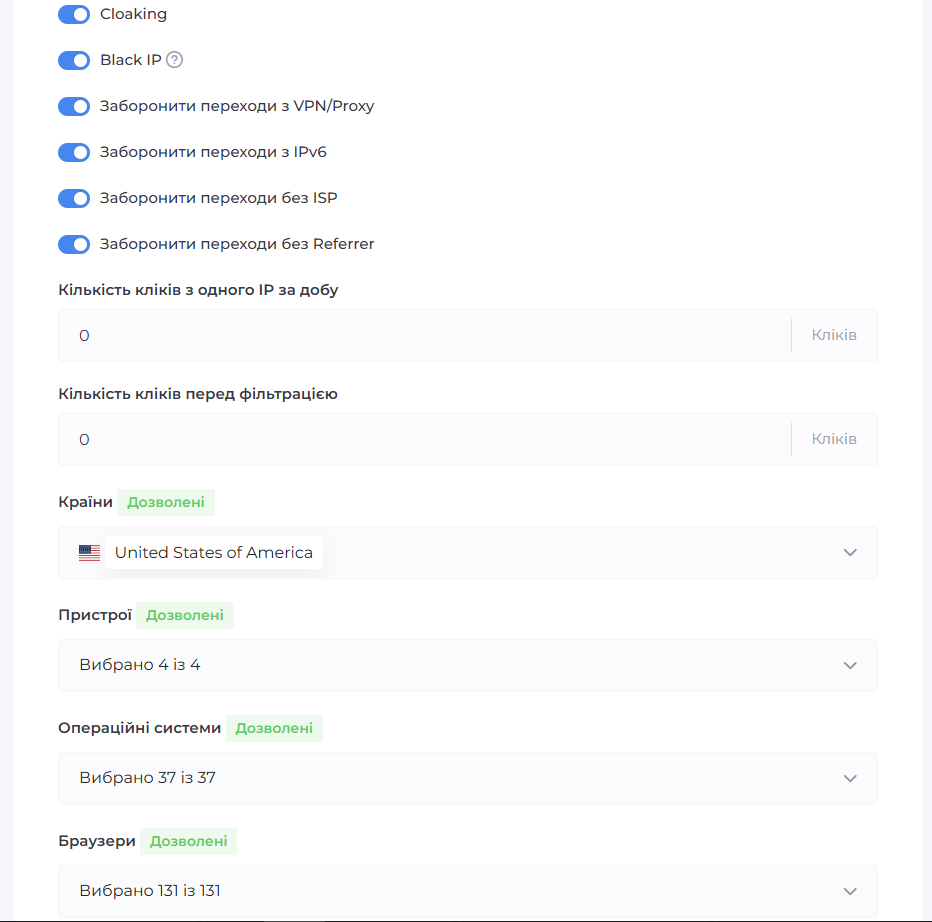
- GEO (countries) – defines from which countries it is allowed to display the Offer Page.
- Devices (mobile, desktop, tablet) – filters traffic by user device type.
- Operating system – allows you to display content only on certain OSes (Windows, macOS, Android, iOS).
- Browser – display settings for specific browsers (Chrome, Safari, Firefox, etc.).
- ISP – filters traffic by Internet provider.
- VPN/Proxy – identifies users connecting via VPN or proxy and allows you to block them.
- IPv6 – allows users with IPv6 addresses to be processed separately.
- Referee – checks the source of the transition.

4. Integration
Cloaking.House supports two integration options.
Option 1 — through a PHP script (main)
Upload the integration file in the flow settings.
- Place it in the root of your domain.
- Make sure it is running correctly on the server.
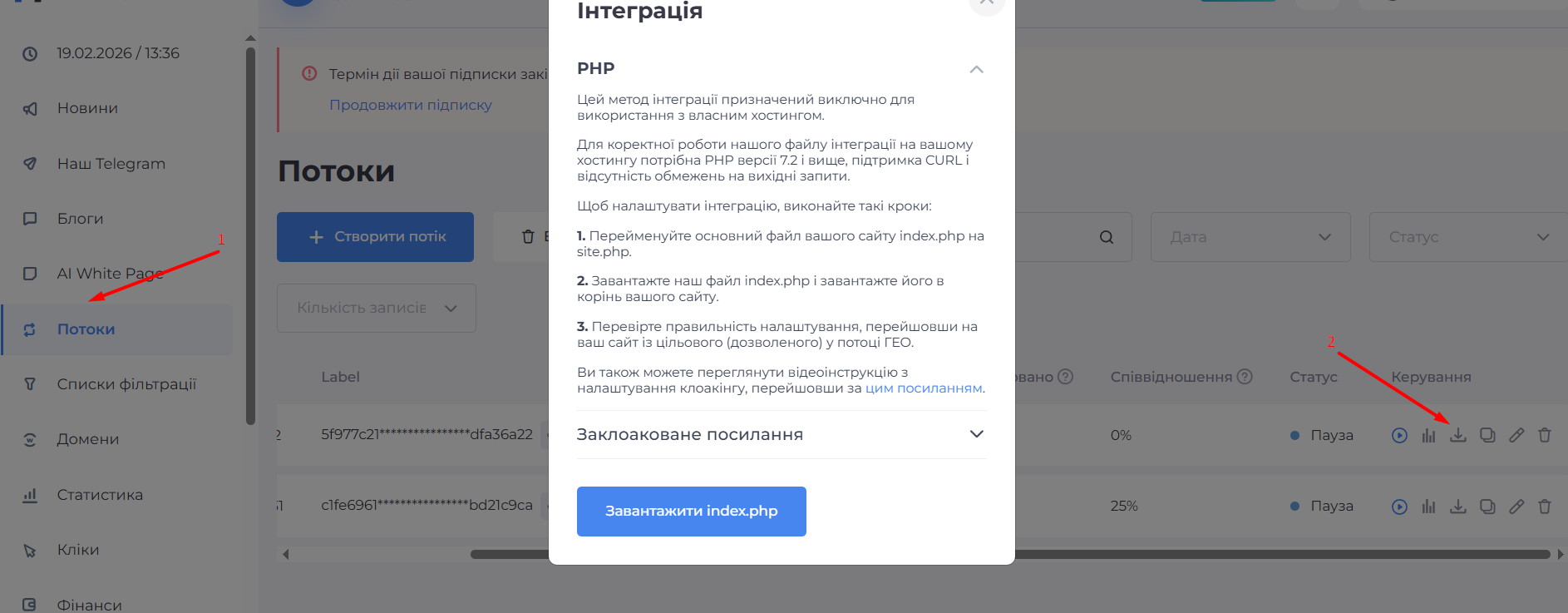
This option is used if you want the filtering logic to pass through your hosting and upload the page efficiently
Here's what it looks like in the file manager:
- site.html — our renamed white page main file
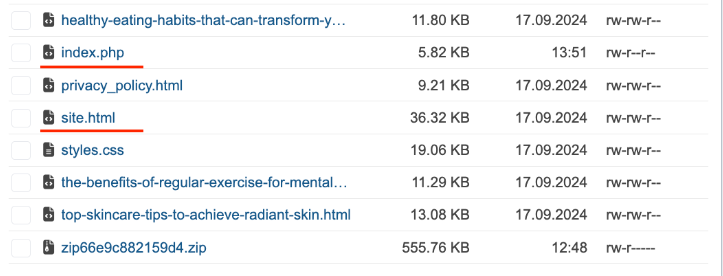
index.php — the cloaking file that we downloaded
Option 2 — through domain connection
This method is convenient when you already have a ready-made white page with a link, but there is no access to its files.
.png)
- Add a domain in the Domains section or purchase directly from the service.
- Register the NS servers of the service with your registrar.
- Wait for the DNS to update.
After that, you will receive a cloaked link that will be used in advertising campaigns.
5. Activation and testing
After completing the settings:
- Save the changes.
- Transfer the flow status to Active.
- Conduct comprehensive testing.
.png)
To check the correctness of the flow settings, it is recommended to test the opening of pages from different conditions: from your main IP, through a mobile network, through a VPN, as well as from different devices and browsers.
Additionally, specific IP addresses can be whitelisted to verify how the system displays the Offer Page for allowed traffic, and to ensure that users who pass the filter receive the targeted content, while the rest of the traffic is redirected to the White Page.
6. Statistics and control
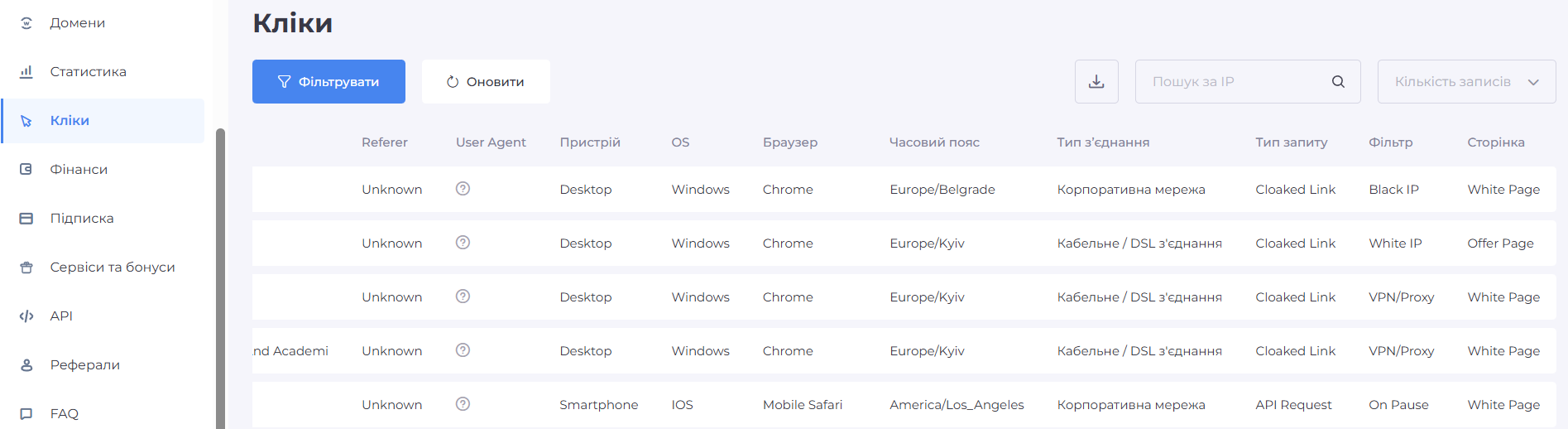
Analytics for each click are available in the panel:
- number of hits;
- distribution by country;
- types of devices;
- filtered traffic;
- IP and technical parameters.
- Which filter worked?
- Where the click was directed.
Regular analysis of flow statistics allows you to evaluate the effectiveness of filtering, adjust rules in time, detect suspicious traffic and optimize the operation of advertising campaigns, providing more accurate guidance of users to the Offer Page and control over the display of the White Page for unwanted traffic.
Conclusion
Cloaking is a traffic management and segmentation tool that allows you to separate users according to specified conditions.
Cloaking.House provides a complete set of tools for creating flows, flexible filtering, white page generation and traffic analysis within a single cloud platform.
Bonus for readers, promo code INFERRA gives a 30% discount on all tariffs Cloaking.House
Additional questions for the Cloaking.House team
After preparing the guide, we also gave it to the team Cloaking.House a few additional questions.
They shared their experience of working with buyers and talked about the moments that most often arise during the first cloaking setup.
What are the typical mistakes buyers make when connecting cloaking for the first time, and how to avoid them?
Typical mistakes made by buyers when connecting cloaking for the first time include incorrect placement of the White Page or incorrect renaming of the main file, choosing the wrong method of operation for pages, incorrect setting of GEO filters, device types or VPN/Proxy, lack of testing, as well as ignoring flow analytics.
By what signs or actions can you understand that cloaking is not working correctly, and what should be checked first?
Signs of improper cloaking usually appear as follows.
- Firstly, the page is not displayed at all, in this case you should check whether the White Page has been loaded correctly and whether the main file is located in the root of the domain.
- Secondly, the absence of clicks in the statistics indicates that the cloaking is configured incorrectly, and it is worth checking the methods of operation of the pages and the correctness of the integration of the file or the connected domain.
Thirdly, if users don't see the Offer Page even when their IPs are whitelisted, this also indicates a problem. In this case, you should check whether the pages are configured correctly, whether the paths to the White Page and Offer Page are specified correctly, and whether the correct method of operation is selected for each page
Inferra Media
From our experience of communication with buyers and teams, the biggest problem with cloaking is not the service itself, but the approach "to fill faster".
90% of failures occur due to:
— lack of a normal White Page,
— lack of testing from different IPs and devices,
— blindly copying other people's filters without understanding the logic.
If cloaking becomes part of the working infrastructure for you, and not a "hack against moderation", it really increases the stability of launches and reduces the number of unpredictable bans at a distance.


.png)
